Development Mode
How Development Mode Works
The devMode option has been introduced to speed up local development while updating your room implementation.
Do not use devMode in a production environment - This feature is not optimized for a large amount of rooms. Use it for local development only.
Whenever you update your server code, all active rooms are cached locally before the server restarts. The cache includes their state and the sessionId’s of previously connected clients (seat reservations). After the restart, all rooms are recreated and the cached state is restored.
Clients try to reconnect as soon as the server goes down. They keep trying a few times until they succeed, or the attempt limit is reached.
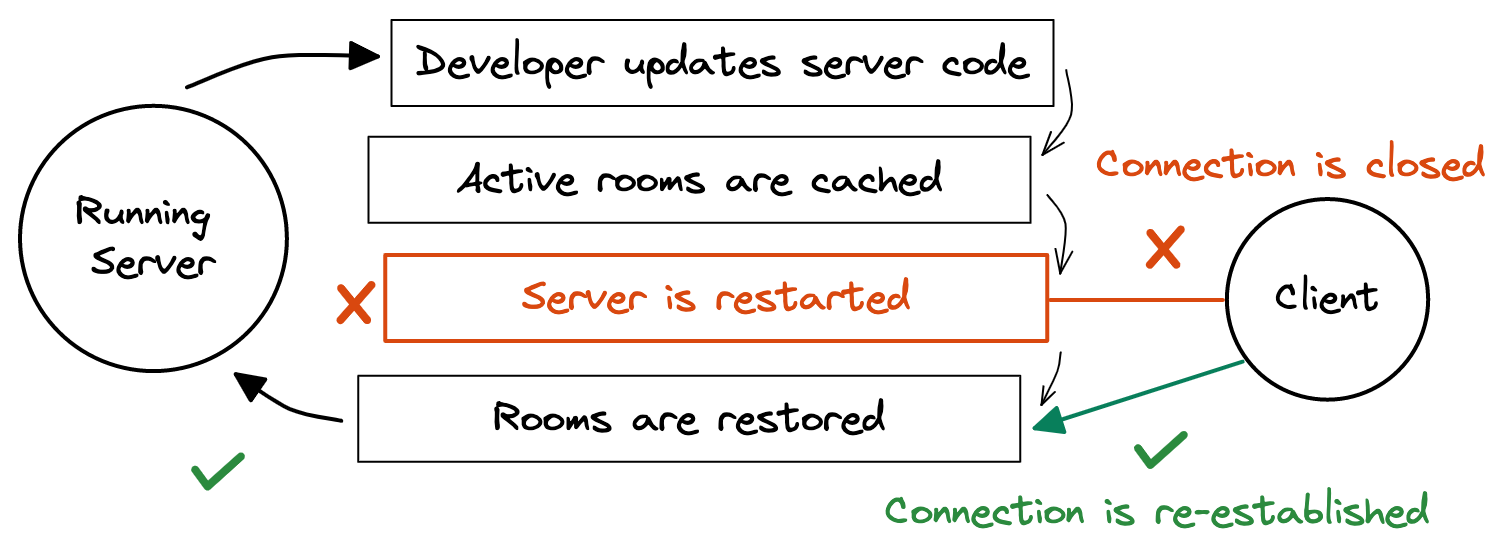
The frontend code is not reloaded, only the connection is re-established. If you want HMR for both your frontend and server code from a single Vite project, see the Vite Plugin.
Enabling Development Mode
The devMode is disabled by default and it can be enabled via Server option:
import { defineServer } from "colyseus";

const server = defineServer({
    // ...
    devMode: true,
    // ...
});Attention on the frontend
Upon re-establishing a connection on devMode, the onAdd schema callback will be triggered again on the frontend.
Be prepared to ignore additional onAdd calls during development.
Restoring External Data
- By default, only the
stateof the room is cached and restored when the server restarts. - You can restore data outside the room’s
stateby implementing theonCacheRoom()andonRestoreRoom()methods. - Only JSON-serializable data is allowed.
onCacheRoom
The onCacheRoom will be executed before the room is cached and disposed.
export class MyRoom extends Room {
  // ...

  onCacheRoom() {
    return { foo: "bar" };
  }
}
onRestoreRoom
The onRestoreRoom will be executed after the room has been restored and the restored state is available.
The argument provided for the onRestoreRoom is the data previously returned by the onCacheRoom method.
No clients are connected yet at this point.
export class MyRoom extends Room {
  // ...

  onRestoreRoom(cachedData: any): void {
    console.log("restoring room", cachedData);

    this.state.players.forEach((player) => {
      player.method(cachedData["foo"]);
    });
  }
}