Troubleshooting “Deploy failed” errors
Here you will find the most common scenarios where a deployment can fail.
When a deployment fails, you will see the following at the bottom of your last “deployment log”:
Error Output:
================
...
Deploy failed
Deploy failed with exit code: 1
The node_modules folder should not be on git
Symptom: “Permission denied” errors as shown below:
Error Output:
================
sh: 1: rimraf: Permission denied
  post-deploy hook failed
Deploy failed
Deploy failed with exit code: 1 Solution: Remove the node_modules directory from your git repository,
git rm -r node_modules
git commit -m "removing node modules"
git push
Then, try to deploy again.
Not having the package.json in the root of your git project
Symptom: ENOENT: no such file or directory, open '/home/deploy/source/package.json'
Error Output:
================
npm ERR! code ENOENT
npm ERR! syscall open
npm ERR! path /home/deploy/source/package.json
npm ERR! errno -2
npm ERR! enoent ENOENT: no such file or directory, open '/home/deploy/source/package.json'
npm ERR! enoent This is related to npm not being able to find a file.
npm ERR! enoent

npm ERR! A complete log of this run can be found in:
npm ERR!     /home/deploy/.npm/_logs/2023-07-17T18_31_07_252Z-debug-0.log
  post-deploy hook failed
Deploy failed
Deploy failed with exit code: 1
Possible solutions:
- Move your server files to the git root path.
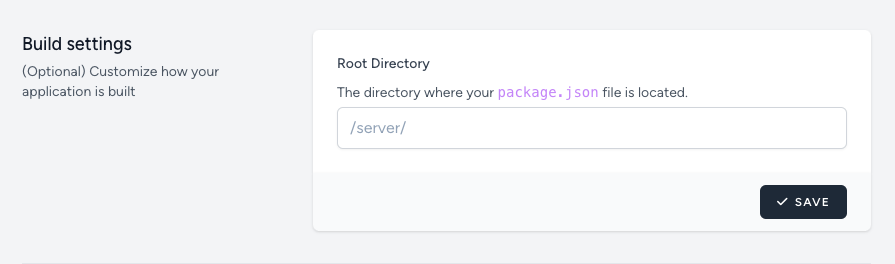
- Alternatively, update the “Root Directory” from your Application’s “Settings” page, under “Build settings”:
Missing, or bad ecosystem.config.js file
Symptom: The following error message Process list empty, cannot save empty list
Error: Process list empty, cannot save empty list
    at fin (/usr/lib/node_modules/pm2/lib/API/Startup.js:448:23)
    at ex (/usr/lib/node_modules/pm2/lib/API/Startup.js:492:30)
    at /usr/lib/node_modules/pm2/lib/API/Startup.js:500:9
    at /usr/lib/node_modules/pm2/node_modules/pm2-axon-rpc/lib/client.js:45:10
    at Parser.<anonymous> (/usr/lib/node_modules/pm2/node_modules/pm2-axon/lib/sockets/req.js:67:8)
    at Parser.emit (node:events:514:28)
    at Parser._write (/usr/lib/node_modules/pm2/node_modules/amp/lib/stream.js:91:16)
    at writeOrBuffer (node:internal/streams/writable:392:12)
    at _write (node:internal/streams/writable:333:10)
    at Writable.write (node:internal/streams/writable:337:10)
Solution: Make sure you have an ecosystem.config.js (or ecosystem.config.cjs) file at the root of the project - with the "script" pointing to your application’s entrypoint.
const os = require('os');

module.exports = {
    apps : [{
        name: "colyseus-app",
        script: 'build/index.js',
        time: true,
        watch: false,
        instances: os.cpus().length,
        exec_mode: 'fork',
        wait_ready: true,
    }],
};
TypeScript compilation errors
If you see TypeScript compilation errors like the example below, read the TypeScript compilation errors article, as it explains how to fix them.
src/app.config.ts(3,28): error TS2307: Cannot find module '@colyseus/playground' or its corresponding type declarations.
src/app.config.ts(25,34): error TS7006: Parameter 'req' implicitly has an 'any' type.
src/app.config.ts(25,39): error TS7006: Parameter 'res' implicitly has an 'any' type.

...

Error Output:
================
  post-deploy hook failed
Deploy failed
Deploy failed with exit code: 1